Lemhi Release — Snake River, ID (Oct 1, 2026)

What's New: October 1, 2026
Snake River release: where the Corps' new dugout canoes ran the Clearwater down into the Snake in October 1805, trading mountain portages for a fast river road through basalt canyons toward the Columbia.
A new Lead Gen assessment turns your website into a source of qualified prospects. AI Intel reports now come back in minutes with their evidence attached, the Public API is live, the client portal opens whichever AI tool your client uses, and you can send the assessment to every licensed employee in one action.
Find Your Agent: Turn Your Website Into a Lead Source
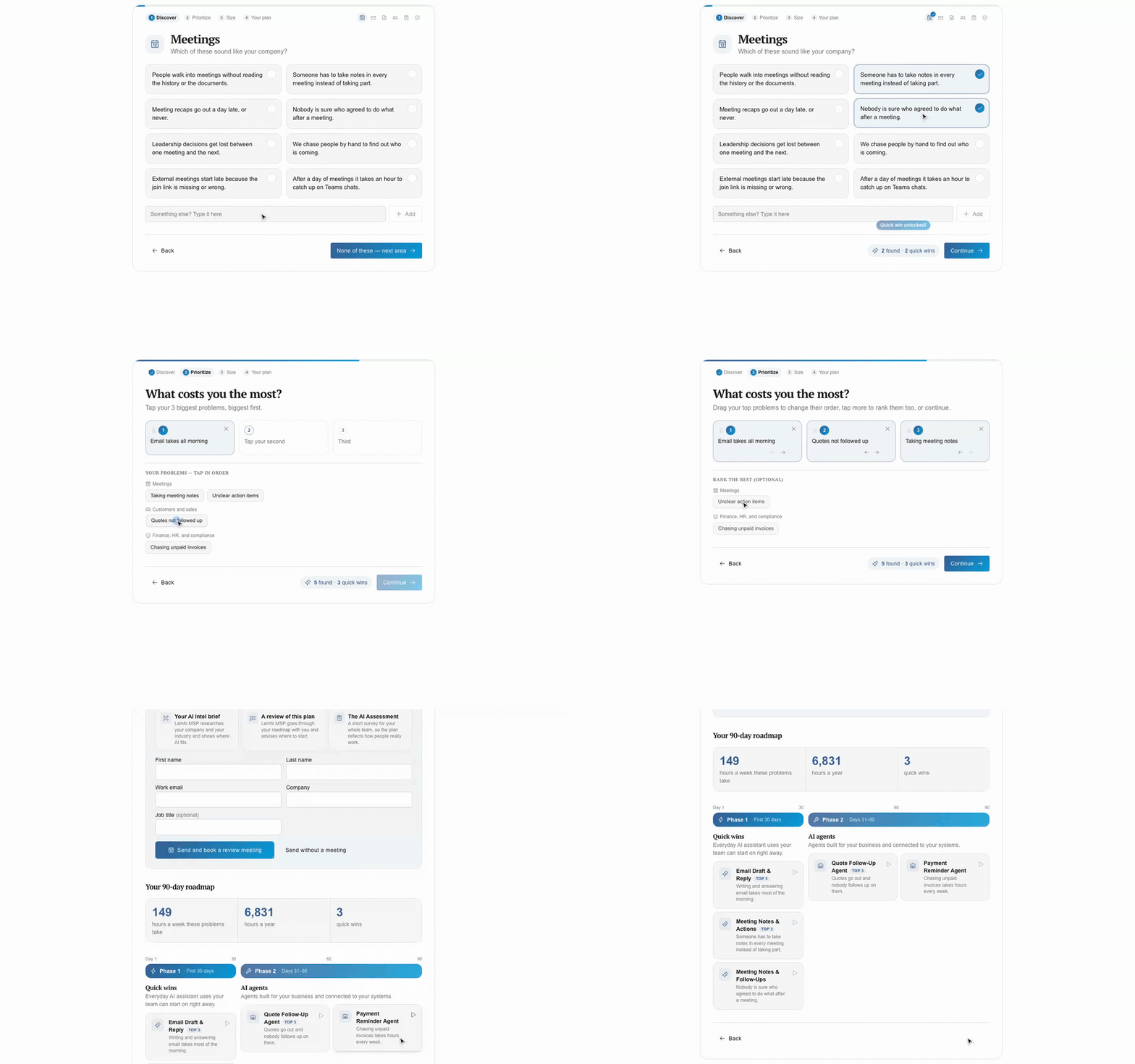
Live on your site in minutes: Open Lead Gen in your sidebar, copy the embed snippet, and the Find Your Agent widget runs on your website in your brand colors and fonts, with no Lemhi branding.
Visitors qualify themselves: A visitor picks the business pains that apply, ranks them, sizes the top three in hours, and gets an invitation to book with you through the booking link under Settings, Branding. By the first call, you already know what hurts.
Every submission becomes a prospect: Lemhi creates or finds a client for the visitor's company, stores a Web Assessment with the ranked pains and matched use cases, lists it on your Lead Gen page, and emails your admins.
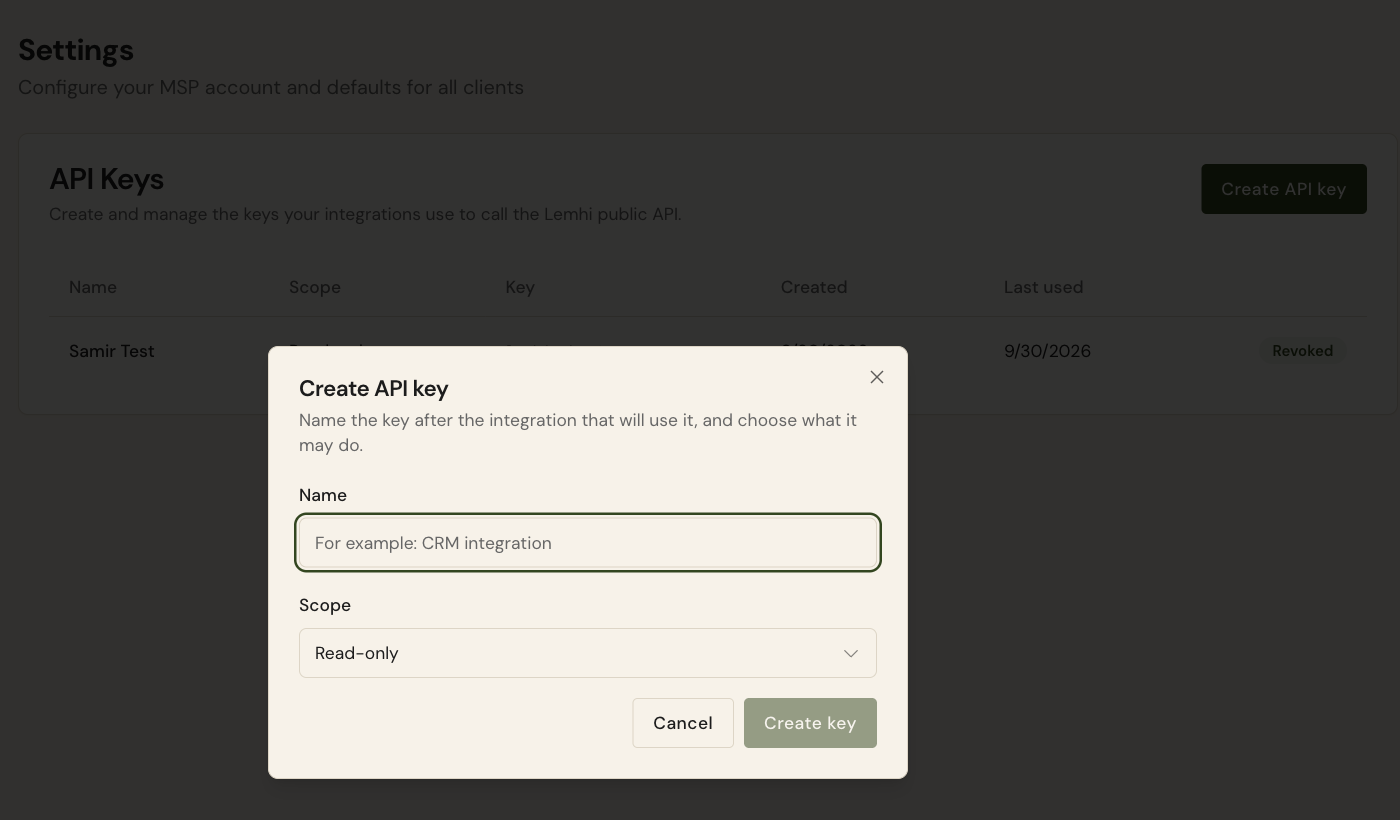
Plug Lemhi Into Your Stack With the Public API
Keys you control: Under Settings, API Keys, a tenant admin creates keys scoped to your MSP, read-only or read-write, and revokes them.
Thirteen operations to start: Read your clients, their playbooks, AI tools, use cases, and assignable users. Create and update tasks and their steps, so your PSA or an automation pushes work into Lemhi and checks it off.
Docs at developers.lemhi.ai!
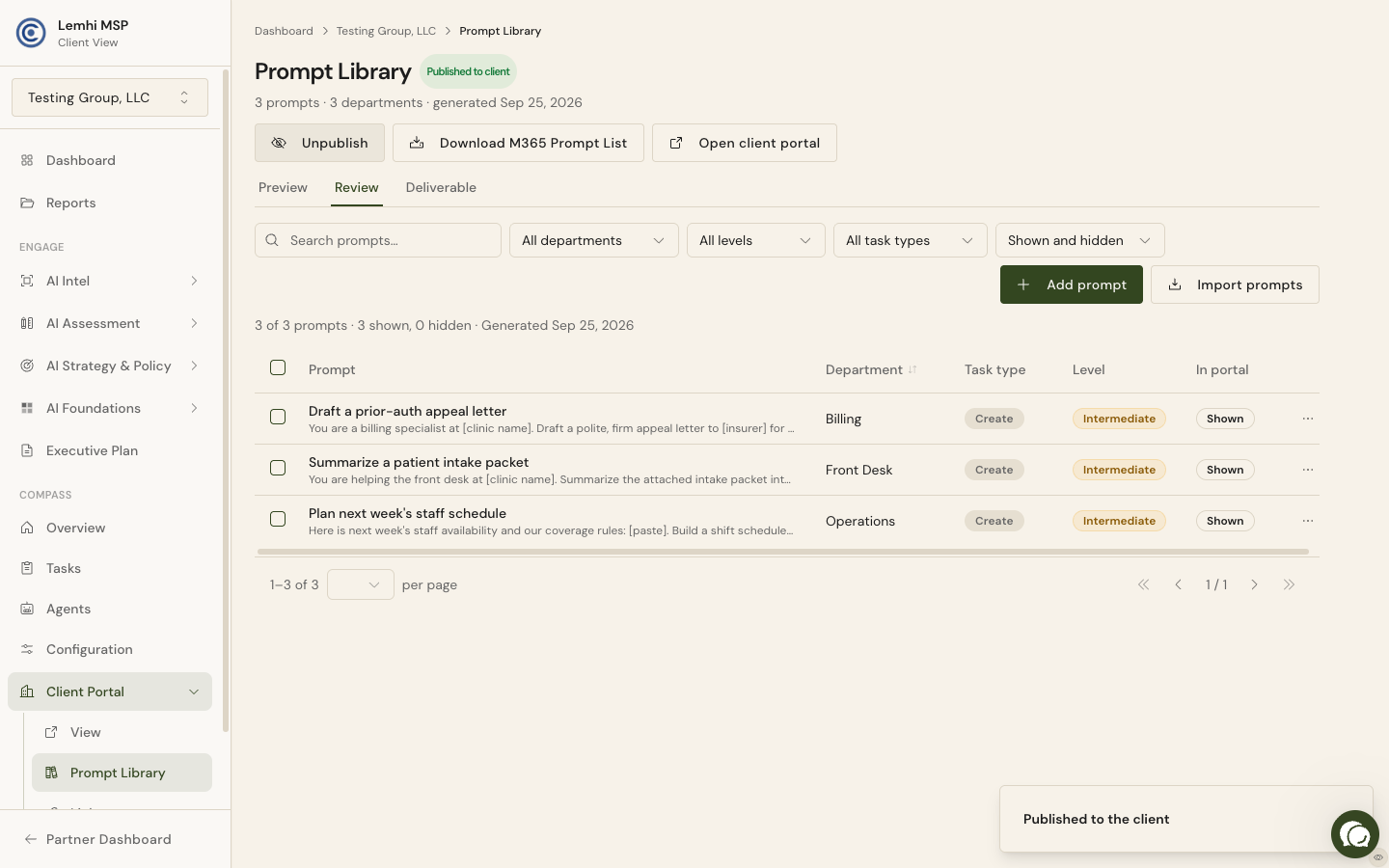
A Client Portal Built Around the Client's AI Tool
Every screen opens the tool you recommended: The dashboard tile opens the AI tool you chose for that client (ChatGPT, Claude, Gemini, or Copilot), and every prompt has Copy prompt and Open in that tool, so employees practice where you support them. Set it per client in Client Settings.
Your practice on the page: Add up to three link tiles under "From [your MSP]", point the AI Policy tab at a policy already in SharePoint, and every client-facing page carries a browser tab icon made from your logo.
A prompt library you curate: A searchable Review tab lets you edit, hide, delete, or add prompts, and import a spreadsheet of prompts you've already written.
Ideas with a private option: An employee can submit an idea privately. It reaches you as Awaiting review on the Use Case Inventory, where you tidy the wording and publish it, archive it, or leave the submitter a note only they can see.
Run the Assessment at Scale, Then Show Every Answer
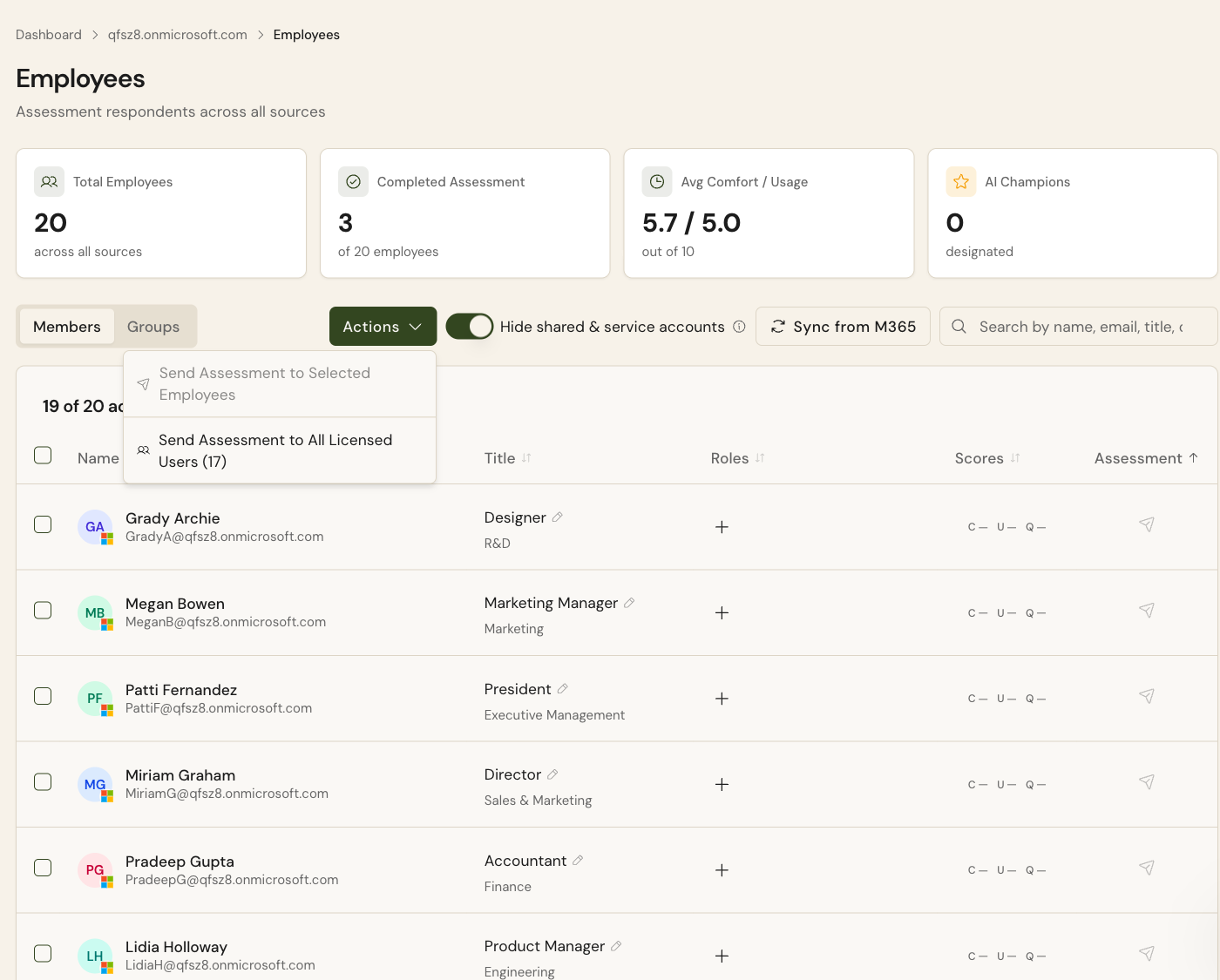
Send to everyone in one action: Actions on the Employees page includes Send Assessment to All Licensed Users. It emails every licensed employee who hasn't completed the assessment, shows the count before you confirm, and skips shared mailboxes and service accounts.
Give employees a reason to finish: Invitations take a due date that carries into the reminders. Or have a leader at the client send it: the leader gets a ready-to-send email in their own voice with the whole team on the To line. The default invite now says about five minutes and promises AI tips for their role, which the completion screen delivers.
Every answer, in one branded report: Assessment Response Details, under AI Assessment and on the Reports hub, shows scores by respondent and group, use case selections, tools in use, and a complete record per respondent. Export it to PDF or Word, or pull it into a custom report.
AI Intel Reports in Minutes, Ready for the Client
Reports in minutes: Every new report and refresh runs on the rebuilt research pipeline, live for all tenants since September 27. A full report completes in under ten minutes, typically five to seven, so you can run one while you prep for the meeting.
Written in the client's language: The opening explains the company's work and where AI matters to it in plain business language an executive reads without translation. Competitor rows link to evidence about each peer, and the opportunity view sets every benefit on an effort and value matrix.
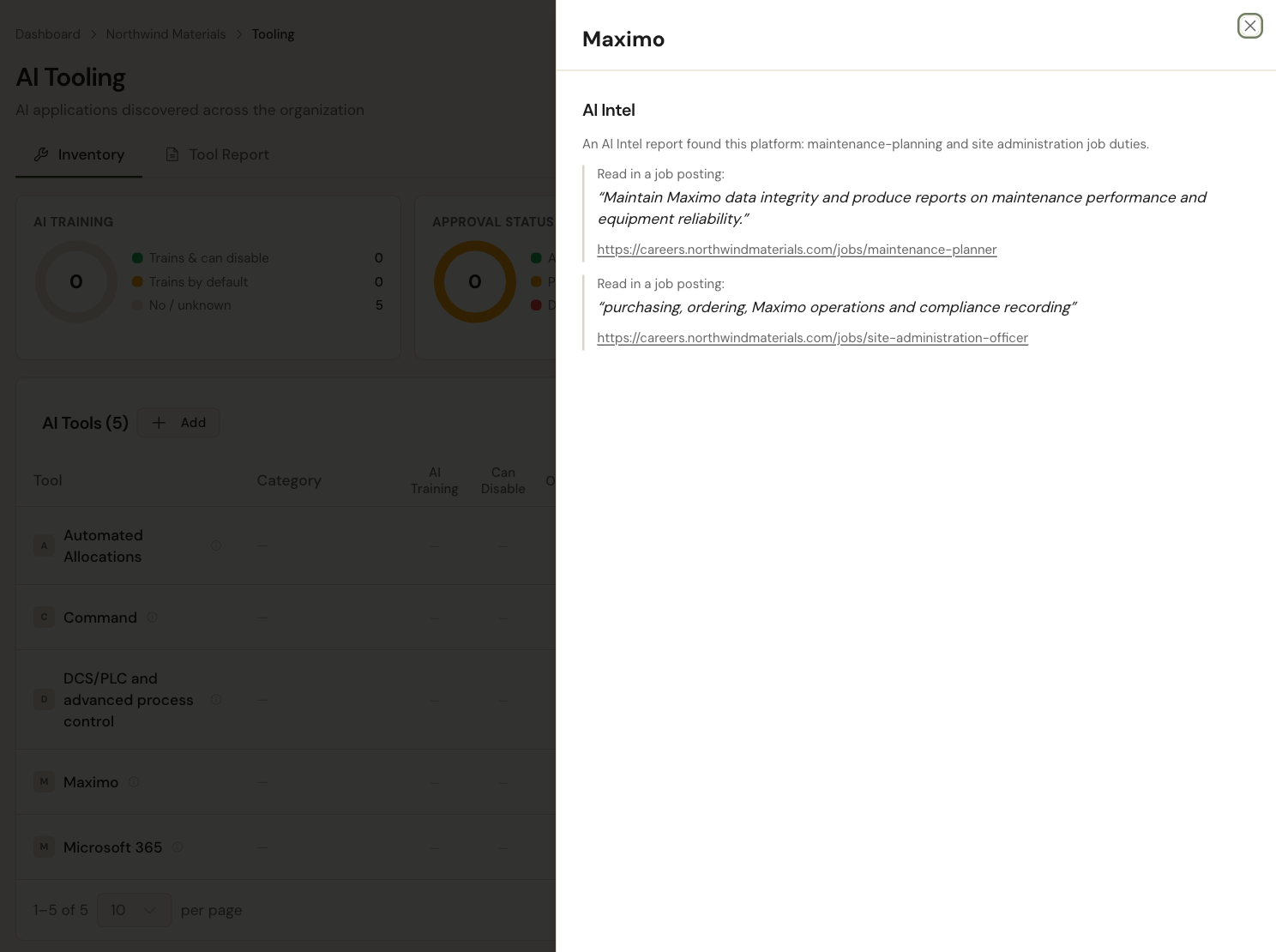
The evidence follows into the Tooling Inventory: The business platforms a report finds (Salesforce, NetSuite, Yardi) appear on the client's AI Tooling page, badged AI Intel and marked Pending, each with the source quote and link, so you have an answer when a client asks how you know.
Coming Soon
Shadow AI from the network and installed apps: The Inventory tab will show AI services that managed devices reached (from Defender for Cloud Apps) and AI desktop apps installed on company computers (from Intune), each labeled by source.
Bug Fixes and Other Improvements
The Copilot Agents table in AI Observability shows each agent's last reported use, with recency filters
Users in more than one MSP tenant land in their home tenant with a tenant switcher
Your MSP dashboard shows your Lemhi account owner and account manager with a booking link
The GDAP import panel opens full height and shows each tenant's domain, Partner Center tags, GDAP expiry, and Engage status
The Data Governance Sites table keeps the site name in view, flags sensitive-sounding names, and links into Microsoft 365
Every employee title is editable, including synced ones; shared mailboxes and service accounts are hidden by default
Client sidebar reorganized: AI Intel dropdown, Tooling under AI Assessment, AI AUP Builder under AI Strategy
Time-savings numbers use one unit and say whether they're one person's estimate, a per-employee average, or an organization total
Report and deck covers size your logo by its shape, so a wide wordmark is no longer a thin strip
The client portal moved to teamaiportal.com (old links redirect), names the client's tool instead of assuming Copilot, and lists approved tools first
Invitations to a few hundred employees no longer fail partway; hard bounces aren't re-emailed; removed users leave completion notifications
A person turned away at sign-in can be re-invited, and an MSP that changes its email domain no longer locks out its users
AI Intel reports start for sites with a broken certificate, say when the company was found at another website, and no longer pile up on refresh
AI Intel's View All shows findings as charts and lists, the PDF drops near-empty pages, and the Sales Briefing no longer claims AI use without evidence
Also: ConnectWise tickets show who pushed them; the Use Cases table links to its process; an empty Results page explains the assessment; the survey rejects personal email domains; the invitation preview shows the selected person's name; the 3-day and 7-day reminders use the same wording as the invitation